Unhappy with the accuracy of 1 arc second SRTM data for your Rail Simulator1 route?
ReDem can help. ReDem can use the highest terrain data available for your route from the USGS. A large portion of the US is available in 1/3 arc second format and there are even areas where 1/9 arc second data is available. 1/9 arc second data comes close to "maxing out" the terrain resolution of Rail Simulator.
Having trouble getting good terrain alignment at the edges of SRTM data?
ReDem can help. ReDem uses seamless data from the USGS, reducing alignment issues at the edges of the SRTM 1 arcsecond tiles.
Have you worn the legend off the "T" key on your keyboard loading terrain data one tile at a time?
ReDem can help. ReDem can't replace your worn "T" key but it does create large areas of terrain with a few mouse clicks. ReDem uses the marker data you already have for your route to build a "shopping list" of needed tiles, advises you on what area to download from the USGS, and then uses the downloaded data to automatically build all the tiles on the list.
BTW, ReDem also allows you to mix 1, 1/3, and 1/9 arc second data in the same route so you don't to settle for lower resolution terrain over the whole route if higher resolution data is available for parts of the route.
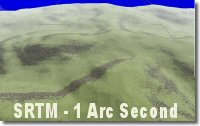
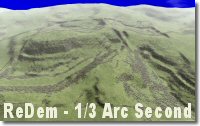
Here are some comparison screen shots of terrain based on Rail Simulator 1 arc second SRTM data and 1/3 arc second terrain generated by ReDem.
Which terrain would you want for your route?
ReDem requires an XP or Vista system with .Net Framework 3.5 installed. If not already installed on your computer, the .Net Framework can be installed during ReDem installation.
Check out the documentation, download ReDem for FREE and try it out.
1ReDem is not supported or endorsed by Rail Simulator Developments Ltd.